Модуль связи MVI69E-MBS Modbus
Start1 Here
To get the most benefit from this User Manual, you should have following skills:
Studio 5000 Logix Designer ®: launch the program, configure ladder logic, and transfer
the ladder logic to the processor
Microsoft Windows ®: install and launch programs, execute menu commands,
navigate dialog boxes, and enter data
Hardware installation and wiring: install the module, and safely connect Modbus and
CompactLogix or MicroLogix 1500-LRP devices to a power source and to the MVI69E
MBS module's application port (s)
System Requirements
The MVI69E-MBS module requirements the following minimum components:
Rockwell Automation CompactLogix or MicroLogix 1500-LRP ® processor (firmware
version 10 or higher), with compatible power supply.
The module requirements 500 mA of available 5 VDC power
Rockwell Automation Studio 5000 Logix Designer Programming Software
Rockwell Automation RSLinx Communication Software Version 2.51 or higher
ProSoft Configuration Builder (PCB) (included)
ProSoft Discovery Service (PDS) (included in PCB)
Pentium ® II 450 MHz minimum.
Supported operating systems:
o Microsoft Windows 10
o Microsoft Windows 8
o Microsoft Windows 7
o Microsoft Windows XP Professional with Service Pack 1 or 2
128 Mbytes of RAM minimum, 256 Mbytes of RAM recommended
100 Mbytes of free hard disk space
256-color VGA graphics adapter, 800 x 600 minimum solution
Deployment Checklist
Before you begin to configure the module, consumer the following questions. Your answers will
help you determine the scope of your project, and the configuration requirements for a successful
deployment.
Are you creating a new application or integrating the module into an existing
application?
Most applications can use the Sample Add-On Instruction or Sample Ladder Logic
without any modification.
Which slot number in the chassis does the MVI69E-MBS module occupation?
For communication to occur, you must enter the correct slot number in the sample
program.
Are the Studio 5000 and RSLinx software installed?
RSLogix and RSLinx are required to communicate to the CompactLogix or MicroLogix
1500-LRP processor.
How many words of data do you need to transfer in your application (from CompactLogix
or MicroLogix 1500-LRP to Module/to CompactLogix or MicroLogix 1500-LRP from
Module)?
Is this module replacing an existing legacy MVI69-MCM module (refer to section)
Legacy Mode on Page 76)?
Package Contents
The following components are included with your MVI69E-MBS module, and are all
required for installation and configuration.
Setting Jumpers
When the module is manufactured, the port selection jumpers are set to RS-232. To use RS-422
or RS-485, you must set the jumpers to the correct position. The following diagram descriptions
the jumper settings.
The setup jumper acts as "write protection" for the module's firmware. In "write protected"
mode, the setup pins are not connected, and the module's firmware cannot be overwritten. The
module is shipped with the setup jumper off. If an update of the firmware is needed, apply the
setup jumper to both pins.
The following illustration shows the MVI69E-MBS jumper configuration, with the Setup
Jumper OFF.
Installing the Module in the Rack
1 Make sure the processor and power supply are installed and configured before installing the
MVI69E-MBS module. Refer to the Rockwell Automation product documentation for
installation instructions.
2 Move the module back along the Tongue-and-groove slots until the bus connectors on the
MVI69 module and the adjacent module line up with each other.
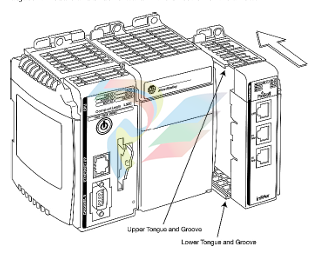
3 Push the module's bus lever back slightly to clear the positioning tab and move it first to
the left until it clicks. Ensure that it is locked first in place.
5 Press the DIN-rail mounting area of the controller against the DIN-rail. The latches
momentarily open and lock into place.


